The recorded task
On 21 September 2026, an Agent used macOS rdp-cli 0.1.0 build 2026092001 to operate Shotcut 26.8.1 on Windows 11 over RDP at 1440 × 900. The local computer supplied an original Mandelbrot animation; Shotcut performed the trim and export remotely. This article explains that existing result, not a new test run or proof that every video editor works.
Download the eight-second source · Download the archived four-second result
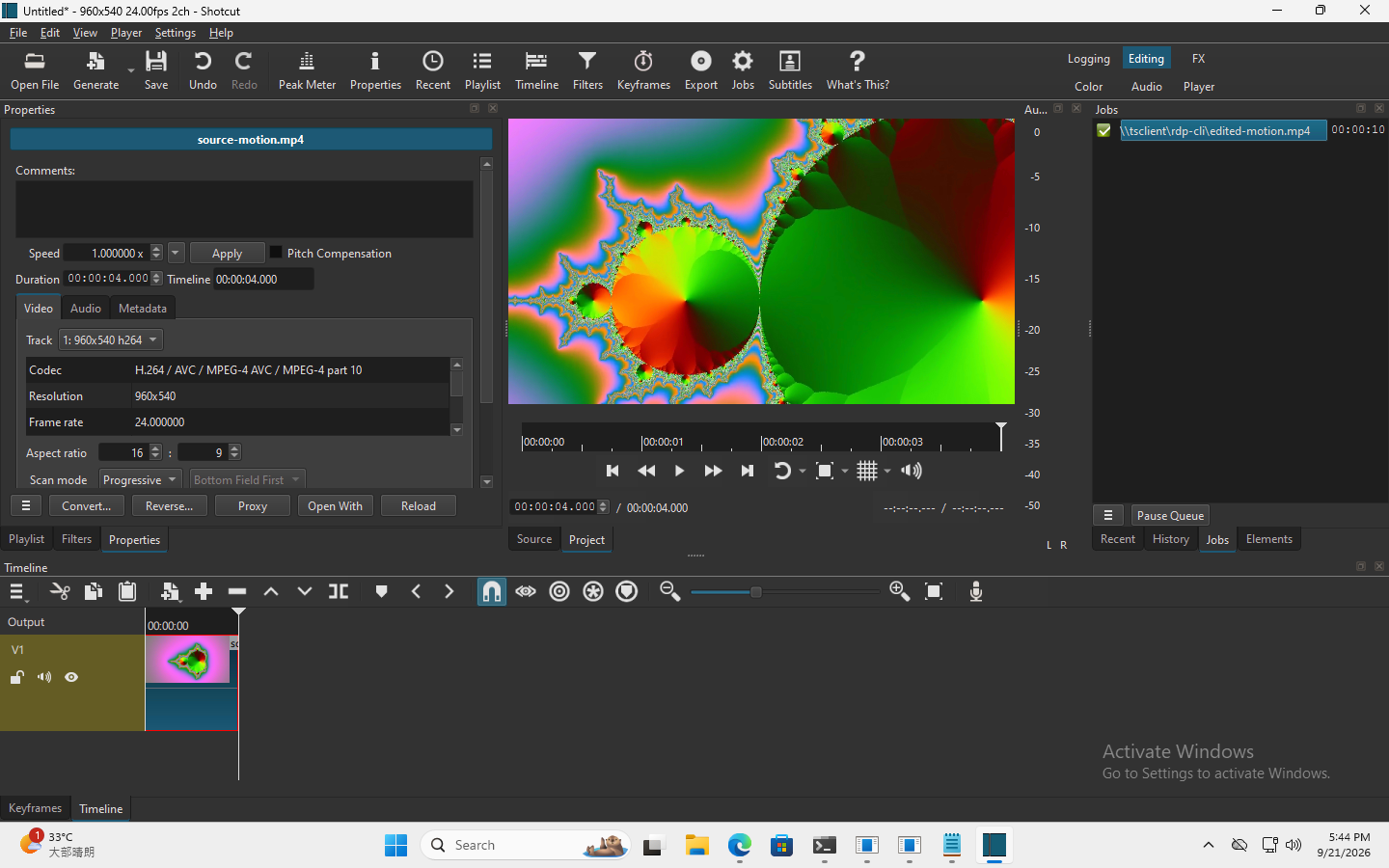
Original English interface recorded on 21 September 2026. The screenshot remains untranslated and unretouched; the guide is localized.
Prepare and upload the source
Use the Mac release and quick start linked below. The authorized Windows RDP server must already have Shotcut installed and allow drive redirection. Input and file permissions are required. Save the source as source-motion.mp4 in your current local directory and replace SESSION with your own data.session. This recorded client was macOS; other client platforms were not part of this video test.
rdp-cli files upload --session SESSION --local ./source-motion.mp4 --path source-motion.mp4
Save the returned data.transfer_id as TRANSFER_ID and query until data.state is completed. The source is 3,319,412 bytes. queued is only acceptance. Paths are relative to the session exchange drive; this is not access to arbitrary Windows disks.
rdp-cli files status --session SESSION --transfer-id TRANSFER_ID
Trim the remote timeline to four seconds
rdp-cli screenshot --session SESSION
Capture the screen, read the PNG at data.path and retain data.observation. Open Shotcut remotely, open source-motion.mp4 from the redirected drive and add it to the timeline. Confirm the source is eight seconds at 960 × 540 and 24 fps. Use actual controls from fresh screenshots, not the coordinates of this article’s image.
Select the timeline clip and open Properties. Focus Duration, select its existing value, then capture again and inspect the selected field. Replace OBSERVATION with that current token and enter the four-second duration:
Before input that may need recovery, specify and save a unique --request-id for each distinct action; replace the example request IDs with your own values. If error JSON arrives, retain its top-level request_id; if the response is completely lost and no original ID was saved, do not invent a new ID to query the old action or blindly resend it.
rdp-cli type --session SESSION --text "00:00:04.000" --observation OBSERVATION --request-id TYPE_REQUEST_ID
rdp-cli screenshot --session SESSION
Read the new PNG, confirm the duration text and use its data.observation as NEW_OBSERVATION before committing:
rdp-cli key --session SESSION --keys ENTER --observation NEW_OBSERVATION --request-id COMMIT_REQUEST_ID
rdp-cli screenshot --session SESSION
Inspect the resulting image: both clip duration and timeline should show four seconds. A successful input response proves dispatch, not that Shotcut accepted the edit. Coordinates, focus and tokens must come from your session.
Export and retrieve your own result
Use Shotcut’s Export panel to export the edited timeline as H.264 MP4 at 960 × 540 and 24 fps to edited-motion.mp4 in the session’s redirected drive. Wait for the green completed job in Jobs. Keep the downloaded archive reference separate: retrieve your remote result locally as edited-motion-reproduced.mp4.
rdp-cli files download --session SESSION --path edited-motion.mp4 --local ./edited-motion-reproduced.mp4
Query files status with this download’s new data.transfer_id, and wait for completed before opening the local video. A listed filename or queued transfer is not completion.
Verify the video, then handle failures
Play the returned file and verify the trim. If FFmpeg is installed locally, its optional ffprobe can also count decoded video frames; it is not required to run rdp-cli:
ffprobe -v error -count_frames -select_streams v:0 -show_entries stream=codec_name,width,height,r_frame_rate,nb_read_frames,duration -of json ./edited-motion-reproduced.mp4
The archived result was H.264, 960 × 540, 24 fps, 96 video frames and 4.000 seconds of video. The container duration was 4.010 seconds because of encoded audio padding. It was 1,442,310 bytes, SHA-256 4c05d91108ee9afaae77aa6a76896f03ee35c9b61de91a3a0b332e905be2ddc5. This hash identifies the archived download, not every reproduction; encoder settings and metadata can change the bytes. The case did not validate real audio listening or complex-project performance.
- Wrong field or stale observation: stop, capture and inspect again. Refresh tokens after pause, takeover or reconnect; resume only after an authorized handoff.
- Export still running or
FILE_BUSY: wait for Shotcut to finish, inspect Jobs and query the transfer. Check the exported path is on the exchange drive, not only the remote Desktop. - Destination already exists: choose a fresh local filename or deliberately use
--overwrite; do not overwrite the archived reference by accident. - Input timeout: query
operations statuswith the original request ID and inspect the screen before retrying. An unknown response is not evidence that the edit did not happen.
Mac download · Quick start · Command reference · File transfer guide